A Mench.ai product • Human-in-the-loop • Compliance-friendly
LeadIntelli turns public webpages into clean, actionable leads — using copy & paste.
Capture what you can already see on public pages, structure it into records and contacts,
then run AI analysis on your saved snapshots. No scraping. No crawling. No automated access.
LeadIntelli helps you organize and analyze data after you access it manually. It does not scrape, crawl, or bypass site controls.
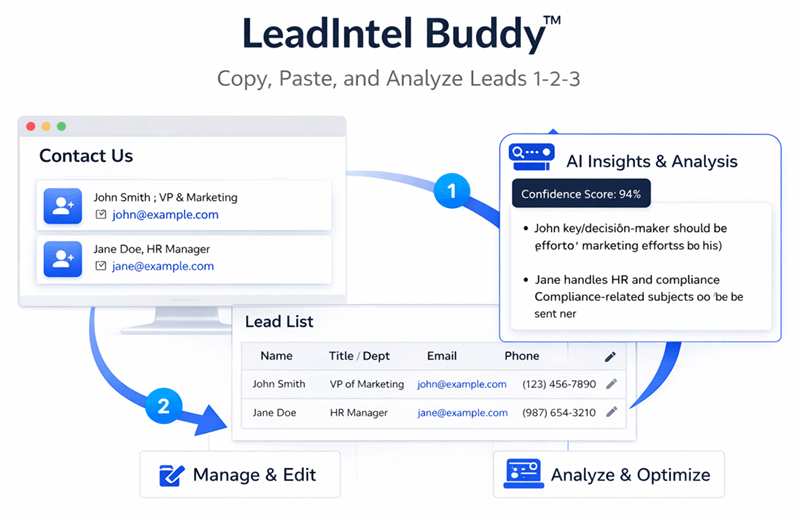
The “1-2-3” workflow
1) Copy visible page text
Open a public page → Ctrl+A → Ctrl+C
2) Paste + structure
Parse and save into records and contacts (editable)
3) Analyze with AI
Explain / Risk Signals / Report / Outreach Email using saved DB snapshots only
Built-in views
• Collect companies data
• Analyze with AI
• Entities / Records / Contacts
Choose your Source Module
Source modules guide instructions and AI interpretation — they do not automate access.
Other / Custom Registry
Best for Contact Us pages and general directories. Includes AI → Structure Contacts.
Insurance Licensing
Capture licensing listings and normalize contacts and identifiers into structured records.
Government Vendors
Turn vendor profiles into usable prospect records with structured fields and AI summaries.
Advertising Agencies
Extract agency contacts and departments for business development workflows.
Media Properties & Rates
Capture publisher pages and structure outreach-ready contacts by department.
Financial Licensing (NMLS)
Highest-value workflow: entities, contacts, licenses, batch comparisons, and compliance-grade reporting.
Safer than scraping tools
LeadIntelli is human-in-the-loop by design. You access pages manually and paste visible text. The system structures and analyzes only what you provide.
What LeadIntelli does
• Structures pasted text into records and contacts
• Stores snapshots in your account
• Runs AI actions on saved DB fields only
• Keeps provenance via batches
What LeadIntelli does not do
• No scraping or crawling
• No bypassing CAPTCHAs or paywalls
• No automated access to protected sites
• No stealth data collection
Pricing
Choose the plan that matches your workflow. NMLS delivers higher-value compliance workflows and is priced separately.
Annual pricing available where configured
Starter
Launch
$49/mo
For teams capturing public-page lead data manually and structuring it into clean records.